
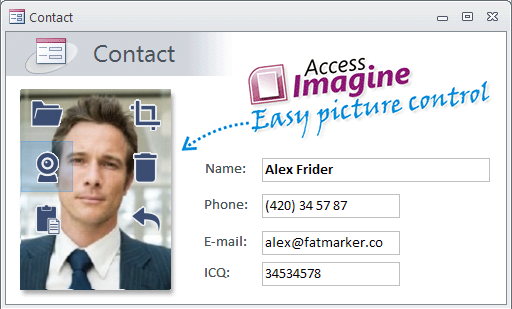
AccessImagine is the best Microsoft Access image solution:

  • easy way to insert images
  • saves database from bloating
  • covers all your future needs
  • requires NO programming
Download now              Watch action video
Complete feature list: browse and load, drag-n-drop, paste from clipboard, aquire from scanner or web-cam images right to database, in-place cropping tool, undo, old OLE data support, display HTTP (web) images, JPEG, BMP, GIF and PNG  file formats support, store images in JPEG format to save space, external image storage with automatic maintaince, anti-aliased image display, automatic resampling, continuous forms solution, on-click full-screen image display fitted to screen or with panning tool, opens image on-click in editing application, 90 degrees image rotating, VBA scripting image manipulations, SQL Servers and .NET languages support.

AccessImagine - Microsoft Access image control: load, scan, paste and drag images right to database. Crop, resample, store externally and generate thumbnails on the fly. Floating buttons interface and on-form crop tool. Fits perfectly Microsoft Access and Visual Studio languages.

34 Responses to “”

  1. Glyn Jones says:

    Hi, hope you can help. I have downloaded and installed your software as i would like to use this to show images in Access 2010. The images have been stored as ‘image’ data type in SQL Server and I have exported the fields from SqlServer along with the image field that is in this format ’460001010100C000C00000F’ Can you advise me how I can use your ActiveX control to display the photo’s? Any help will be greatly appreciated. Rgds Glyn

    • Max D says:

      AccessImagine is fully compatible with Microsoft Access 2010.

      In your case pictures are stored in SQL database as JPEG images. AccessImagine can display and manipulate them without any conversions or additional programming.

  2. slobodan says:

    Data in table are stored as bmp image.how to convert them to long binary data

  3. slobodan says:

    Thanks.It works with bmp ole , but what in case picture ole

  4. taste of the wild dog food says:

    well i just downloaded this component, the features are quite interesting, anyways i liked it!!

  5. JonathanSFL says:

    Can the TWAIN upload tool be connected to a webcam to grab a frame? Like for an ID badge?

    • Max D says:

      Sure. Most webcams support TWAIN interface.

      For webcams, that do not, can be used one of 3rd-party utilities that make them TWAN-compliant.

  6. Kenneth Hudson says:

    I can not figure out how the undo feature works. Do you have any documentation on it. I was also wondering if you can turn on/off some of the other commands like “scan” that appear in the image window when the user clicks the picture. I am a registered user. Thanks.

    • Max D says:

      The undo feature is designed to return to the original picture that was in database before any operations. Does it behaves in such a way?

      There is no way to turn off Scan button now. Do you need this so hard?

  7. Kenneth Hudson says:

    I assume you mean that the control must be bound to work. I was using the control unbound by using the .LoadFile() method. Controlling the features would be a nice addition to the next release. Thanks for the reply.

  8. FARHAN says:

    this software excellent.Can direct capture from camera NIKON D7000.Is EZ to do a picture data

  9. Lorin says:

    It seems that it would be trivial to allow other types of files to be attached such as PDF, docx and so on. Those of us who use a MySQL backend could use that ability and eliminate that ole object

    • Max D says:

      Thats not so trivial, as the logic for images and general-file-storage is quite different. Maybe we will create another component for files, instead of regular Attachment type.

  10. Jeyne says:

    I am very interested in your product, but wanted to make sure everything works before buying. My problem is I have created the table and form/some pictures have been added, but after creating a report in Access 2010, the pictures don’t transfer into it. How do I go about getting the pictures in my form to show up in my report? Thank you

  11. David Robinson says:

    FAnatastic product – but how do I get the the scan function to access the webcam instead of the default scanner

    • Max D says:

      It’s a problem a bit, because AccessImagine doesn’t have source selection to not confuse users.

      It always uses the default one. Here is info, how to specify default TWAIN source thru the registry. Try it and write me back, please:

      HKCU\Software\Microsoft\Windows NT\Twain is the location of the Windows Default Twain Device

      String name ‘Default Source’ and the value is the path of the the .ds file for the scanner (ex. C:\WINDOWS\Twain_32\CSSN800N\CSSN800N.DS)

  12. Nohel says:

    I’m using the control with in MS ACCESS. How can I delete images I´m showing in a form to be ready to do new operations with a new register ( I need “TO BLANK” all the fiedls including OCX fields.

    Thanks

  13. Maram says:

    Hi
    I have Installed the software it is very beautiful

    but am facing aproblem in inserting the picture to my table for specific employee , am using the insert code can any one help me please

  14. Tom says:

    How do you export the images out of access

    • Max D says:

      It depends of the method you saved images in Access.

      For OLE pictures you should use http://www.lebans.com/oletodisk.htm

      For AccessImagine images you should use SaveFile VBA command. Place a button on form with AccessImagine image and bind such a script to it:
      For i = 1 To N
      Pic.SaveFile (“c:\MyPics\” + Str(ID) + “.jpg”)
      DoCmd.GoToRecord , , acNext
      Next i

      For images saved as attachment you need another script too.

  15. Mike H says:

    I could really use this for an application i’m working on if it supported .tif – .tiff images. any chance of that happenin?

    • Max D says:

      AccessImagine doesn’t support TIFFs because there was no big demand from users. Why you need this? I’d like to hear your story.

      TIFF support can be added quickly, if there is a demand.

Leave a Reply